
Technical SEO Basics for Non-Developers: A Practical Guide
Introduction: Why Technical SEO Matters (Even If You’re Not a Developer)
If you run a website, manage content, or do digital marketing, you’ve probably heard the term technical SEO and thought, “That’s for developers, not me.” That’s a common misconception. In reality, technical SEO basics for non-developers are not only learnable, but essential.
Technical SEO is the foundation that allows search engines like Google to crawl, understand, and rank your website properly. Even the best content won’t perform if search engines struggle to access it. As Brijesh Makwana, Digital Marketer, often explains to clients, technical SEO is not about writing complex code—it’s about understanding how your website works and ensuring nothing blocks search engines or users.
This guide is written specifically for non-developers: business owners, bloggers, marketers, and beginners. No coding background required.
What Is Technical SEO in Simple Words?
Technical SEO refers to optimizing the infrastructure of your website so search engines can crawl and index it efficiently. Unlike on-page SEO (content, keywords) or off-page SEO (backlinks), technical SEO focuses on how your site is built and performs.
Think of your website like a shop:
- Content is your products
- Backlinks are word-of-mouth recommendations
- Technical SEO is the road, entrance, lighting, and layout that help people and Google reach and explore your shop
If the road is broken or the door is locked, no one gets in—no matter how good the products are.
Why Non-Developers Should Care About Technical SEO
Many technical SEO issues can be identified and fixed without touching code. If you ignore them, you risk:
- Pages not appearing in Google search
- Slow-loading websites
- Poor mobile experience
- Lower rankings despite good content
Understanding technical SEO basics for non-developers gives you the power to:
- Communicate better with developers
- Fix simple issues yourself
- Make smarter SEO and marketing decisions
How Search Engines Work (Quick Overview)
Before diving into technical SEO, you need to understand how search engines work:
- Crawling – Google bots visit your pages
- Indexing – Google stores your pages in its database
- Ranking – Google decides where your page appears in search results
Technical SEO mainly affects the first two steps: crawling and indexing.
Website Crawling: Can Google Access Your Pages?
Robots.txt Explained Simply
A robots.txt file tells search engines which pages they can or cannot crawl. Non-developers don’t need to write this file, but you must understand its impact.
Common mistakes:
- Accidentally blocking the entire website
- Blocking important pages like blogs or service pages
You can check your robots.txt by visiting:
yoursite.com/robots.txt
If you’re unsure, tools like Google Search Console help identify crawling problems.
XML Sitemap: Your Website’s Map for Google
An XML sitemap lists important pages on your website so Google can find them easily.
Why sitemaps matter:
- Faster indexing of new pages
- Better discovery of deep pages
- Helps large or new websites
Most CMS platforms like WordPress generate sitemaps automatically using SEO plugins.
Tip from Brijesh Makwana, Digital Marketer: Always submit your sitemap in Google Search Console after publishing new sections or major updates.
Website Indexing: Are Your Pages in Google?
Just because a page exists doesn’t mean it’s indexed.
How to Check Indexing
Type this in Google:
site:yoursite.com
If pages are missing, possible reasons include:
- “Noindex” tags
- Duplicate content
- Thin or low-quality pages
Non-developers can often fix this by reviewing SEO plugin settings.

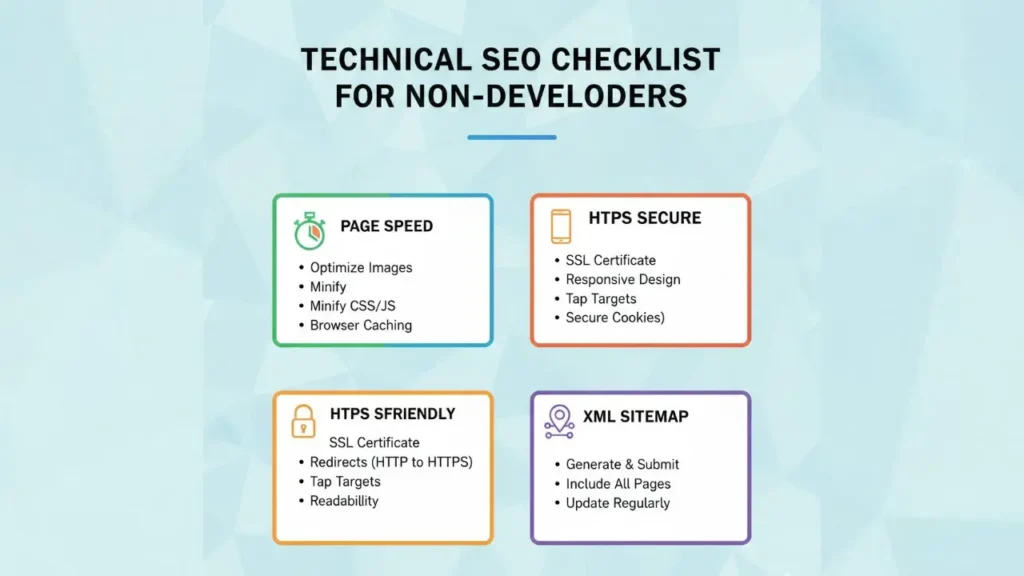
Page Speed: A Critical Technical SEO Factor
Page speed directly affects:
- User experience
- Bounce rate
- Google rankings
You don’t need to code to improve speed.
Simple Speed Improvements for Non-Developers
- Compress images before uploading
- Use fewer plugins
- Choose fast hosting
- Enable caching
Tools you can use:
- Google PageSpeed Insights
- GTmetrix
Mobile-Friendliness: Mobile-First Indexing
Google primarily uses the mobile version of your website for ranking.
If your site is not mobile-friendly:
- Rankings drop
- Users leave faster
- Conversions suffer
What Non-Developers Can Check
- Text readable without zoom
- Buttons easy to tap
- No horizontal scrolling
Most modern themes are responsive, but always test using Google’s Mobile-Friendly Test.
HTTPS and Website Security
HTTPS is no longer optional—it’s a ranking factor.
Benefits of HTTPS:
- Secure data
- Trust signals for users
- Slight SEO boost
If your site shows “Not Secure,” contact your hosting provider to install an SSL certificate. Many hosts offer it for free.
URL Structure: Clean and SEO-Friendly
Good URLs help both users and search engines.
Best Practices
- Short and descriptive
- Use hyphens, not underscores
- Avoid random numbers
Example:
- ❌ yoursite.com/page?id=123
- ✅ yoursite.com/technical-seo-basics
Non-developers can usually edit URLs directly from their CMS.
Duplicate Content: A Silent SEO Killer
Duplicate content confuses search engines.
Common causes:
- HTTP and HTTPS versions
- WWW and non-WWW
- Same content on multiple URLs
Canonical Tags (Concept Only)
You don’t need to write canonical tags, but you should know they tell Google which version is the main one. SEO plugins handle this automatically when configured properly.
Structured Data: Helping Google Understand Content
Structured data (schema) adds extra context to your pages.
Benefits:
- Rich results (stars, FAQs)
- Better click-through rates
Non-developers can add schema using plugins—no coding required.
Broken Links and Errors
Broken links create poor user experience and waste crawl budget.
What You Should Monitor
- 404 errors
- Broken internal links
- Redirect chains
Tools:
- Google Search Console
- Broken link checker plugins
Internal Linking: A Core Technical SEO Element
Internal links help:
- Distribute authority
- Improve crawlability
- Guide users
Best practices:
- Link related content naturally
- Use descriptive anchor text
- Avoid orphan pages
Internal Linking Example:
- Link to your SEO services page
- Link to Google Ads, Social Media Marketing, or E-commerce SEO pages where relevant
Image Optimization for Technical SEO
Images can slow down your site if not optimized.
Non-Developer Checklist
- Use correct image size
- Compress images
- Add descriptive ALT text
ALT text helps both accessibility and SEO.
Infographic Content Idea (For This Blog)
Infographic Title: Technical SEO Basics for Non-Developers
Sections:
- How Search Engines Work (Crawl → Index → Rank)
- Technical SEO Checklist for Beginners
- Common Technical SEO Mistakes
- Tools Non-Developers Can Use
- Impact of Technical SEO on Rankings
This infographic can be shared on blogs, Pinterest, and LinkedIn for extra traffic.
Common Technical SEO Mistakes Non-Developers Make
- Ignoring Google Search Console
- Publishing without checking indexing
- Uploading heavy images
- Not updating sitemap
- Forgetting internal links
Avoiding these mistakes alone can significantly improve rankings.
Tools Every Non-Developer Should Use
- Google Search Console
- Google Analytics
- PageSpeed Insights
- SEO plugins (WordPress)
As Brijesh Makwana, Digital Marketer, advises: tools don’t replace understanding—but they make technical SEO manageable for everyone.
Final Thoughts: Technical SEO Is Not Scary
Technical SEO may sound complex, but when broken down, it’s logical and practical. You don’t need to be a developer to understand the basics—you just need the right framework.
By mastering these technical SEO basics for non-developers, you ensure your content gets the visibility it deserves. Strong technical foundations combined with quality content and smart marketing lead to sustainable SEO success.
If you’re serious about long-term growth, start treating technical SEO as a priority—not an afterthought.
Need Help?
Explore our related services:
Thanks for reading. Keep optimizing, keep growing.